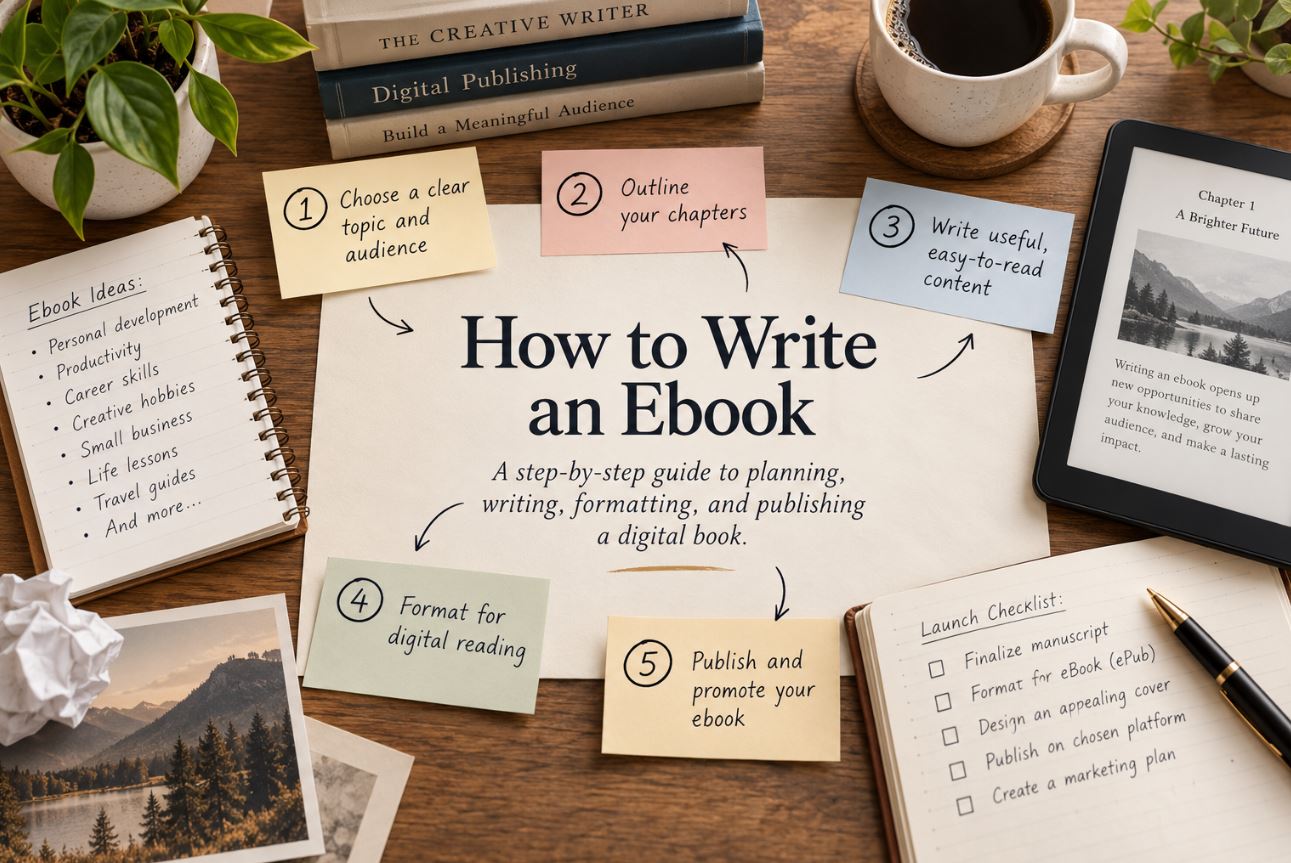
To write an ebook, sum up what your book is about in a few sentences, list the main points it has to cover, turn those points into a chapter outline, then write one chapter at a time until the draft is done. After that, edit it, convert it to EPUB or a Kindle-ready file, add a cover, and publish it on Amazon KDP or another ebook store.
Ebook writing, sometimes spelled e-book writing, follows the same process as writing any book, with a few extra steps for digital formatting and publishing. This guide walks through each step, from your first idea to a published ebook. If you would rather have a professional write it for you, our ebook writing services cover the whole process.
Steps to writing an ebook: quick answer
- Choose your ebook type and reader. Self-help, business, fiction and memoir ebooks are written differently.
- Sum up your ebook in three or four sentences.
- List the major points it must cover.
- Outline the chapters in the order your reader needs them.
- Write one chapter at a time until the draft is finished.
- Edit for structure first, then clarity, then typos.
- Format the manuscript as a Word, KPF or EPUB file.
- Design a cover at 2,560 × 1,600 pixels.
- Publish on Amazon KDP, other ebook stores, or your own website.
How to write an ebook for beginners
If you are writing your first ebook, keep it short, focused and planned. Beginners finish ebooks when they pick one narrow topic, outline before writing, and write a little every day instead of waiting for a free weekend.
- Start small. A focused ebook of a few chapters is easier to finish and easier to sell than a large one.
- Outline first. Know every chapter before you write the first sentence.
- Write daily. Even a short session keeps the project moving.
- Do not edit until the end. Finish the draft, then improve it.
- Publish, then improve. Ebooks can be updated after publishing, so a finished ebook beats a perfect unfinished one.
How to write an ebook for your type of reader
The right way to write an ebook depends on what kind of ebook it is and who will read it. A self-help ebook, a novel and a business guide are written very differently, so decide your type first and study how other books in that category are written.
| Ebook type | Who reads it | How to write it | Search to learn more |
|---|---|---|---|
| Self-help | People trying to change a habit, mindset or situation | Warm and direct, one clear transformation, an exercise or action step in every chapter | “how to write a self-help book” |
| Business or how-to | Professionals and readers solving a specific problem | Practical and structured, short chapters, examples, checklists and steps | “how to write a business book” |
| Fiction | Readers of one genre, such as romance, thriller or fantasy | Scenes, characters and dialogue, following the conventions of the genre | “how to write a [genre] novel” |
| Memoir or life story | Readers drawn to a personal experience or theme | First person, built around turning points and reflection | “how to write a memoir” |
| Cookbook or guide | Readers who want results they can follow | Clear steps, consistent layout, lists and photos | “how to write a cookbook” |
| Children’s | Parents, teachers and young readers | Short, illustrated, written for one age group | “how to write a children’s book” |
| Lead magnet (free ebook) | Potential customers of a business | Short, focused on one problem, with a clear next step | “how to write a lead magnet ebook” |
How to write a how-to guide ebook
A how-to ebook teaches the reader to complete one task from start to finish. Write it as a sequence of steps in the order the reader will do them, explain why each step matters, include examples or screenshots, and end each chapter with what the reader should have done by that point.
Step 1: Choose a focused ebook topic
A good ebook topic solves one specific problem for one specific reader. “Personal finance” is too broad for an ebook. “How to invest in land with a small budget” is focused enough to finish and specific enough to sell.
How to check that people want your ebook
Search your topic on Amazon and in Google. If other ebooks exist and have reviews, there is demand. Read the three-star reviews of those books: they tell you exactly what readers wanted and did not get, which is the gap your ebook can fill.
Why your ebook needs one clear promise
Readers buy an ebook for one result. Decide what the reader will be able to do, understand or feel after finishing it, and make every chapter serve that promise. A focused land-investing guide like Dirt Rich by Jose M. Berlanga, which we helped publish, works because it promises one outcome: building wealth through land.
Step 2: Create your ebook outline with the Writers of the West method
An ebook outline is a chapter-by-chapter plan of everything your ebook will cover, written before you start the draft. Our writers follow the same four-stage method for every ebook: sum up the book, list its major points, outline them into chapters, then write one chapter at a time.
Sum up your ebook in a few sentences
Write what your ebook is about, who it is for and what the reader will get from it, in no more than three or four sentences. If you cannot sum it up, the topic is still too broad.
List the major points
Write down every main idea, lesson, step or story the ebook must include. For a nonfiction ebook these are the key problems and solutions; for fiction they are the major events of the plot.
Turn the points into a chapter outline
Group the points into chapters and put them in a logical order: the order a reader needs to learn them in, or the order events happen. Give more chapters to the parts that matter most to your reader.
Ebook outline template
Use this simple ebook outline template for a nonfiction ebook, and adjust the number of chapters to fit your topic:
| Section | What it covers |
|---|---|
| Introduction | The problem, who the ebook is for, and the promise of what they will get |
| Chapter 1 | Why the problem exists or why it matters |
| Chapters 2 to 4 | The main ideas, steps or methods, one per chapter |
| Chapters 5 to 6 | How to apply them, with examples and common mistakes |
| Conclusion | A short recap and the reader’s next step |
| Back matter | Resources, about the author, and a link to your website or next book |
Structure each chapter the same way
For nonfiction, a simple chapter pattern keeps readers moving: open with the problem, explain the idea, give an example, and end with an action step. Repeating the same pattern makes your ebook easier to read and easier to write.
Step 3: Write your ebook one chapter at a time
Write your first draft one chapter at a time, following your outline, and do not stop to polish earlier chapters until the full draft is finished. A steady routine finishes far more ebooks than occasional long writing sessions.
Set a regular writing target
Pick a target you can actually keep, such as a set number of words a day or one chapter a week, and write at the same time each day if you can. Consistency matters more than the size of the target.
How to write an ebook fast
To write an ebook fast, finish your outline completely before drafting, write every chapter in one sitting per day without stopping to edit, and keep the ebook short and focused. Speed comes from planning, not typing faster.
Should you edit while you write?
No. Editing while drafting slows you down and makes it easy to rewrite the same chapter again and again. Mark anything you want to fix with a note and move on. You will edit the whole ebook at once when the draft is complete.
What if you get stuck?
Go back to your outline and your one-sentence promise. If a chapter will not come together, it is usually because it is trying to cover two ideas. Split it, or skip ahead and come back to it later.
Step 4: How to write a successful ebook readers actually use
A successful ebook is one readers finish and recommend. An ebook earns good reviews when readers can use it. Every chapter should give the reader something they can apply, remember or act on.
- Use examples. Show the idea in a real situation, not just in theory.
- Add action steps. End nonfiction chapters with one thing the reader can do next.
- Cut filler. If a section does not serve the ebook’s promise, remove it.
- Use headings and lists. Ebook readers skim on phones and tablets, so make the structure easy to scan.
Step 5: How to edit an ebook
Edit your ebook in three passes: structure first, then clarity, then spelling and grammar. Fixing typos in a chapter you later cut is wasted time.
Fix the structure first
Read the whole draft and check that the chapters are in the right order, nothing important is missing, and nothing is repeated. Move, merge or cut chapters before you touch individual sentences.
Then improve clarity
Shorten long sentences, replace jargon with plain words, and make sure each paragraph makes one point. Reading the ebook aloud is the quickest way to find sentences that do not work.
Then proofread
Check spelling, grammar, punctuation and consistent formatting. A professional editor catches what you cannot see in your own writing; our book editing services cover every stage, from structure to proofreading.
Can you use AI prompts to create an ebook?
You can use AI prompts to brainstorm topics or test outline ideas, and AI tools can help with proofreading, but check every change yourself and do not let AI write your content or add facts. Amazon requires authors to disclose AI-generated content when publishing on KDP. If you publish on Amazon, read how KDP treats AI-generated and AI-assisted content before you upload.
Step 6: Format your ebook as an EPUB or Kindle file
Format your ebook by converting your manuscript into a file ebook stores accept. You can upload a Word document and let Amazon convert it, build the file yourself with Kindle Create, export an EPUB, or hire someone to format it for you.
KDP’s recommended ebook formats are (KDP supported formats):
- Microsoft Word (DOC or DOCX): converts well for most text-based ebooks, though complex formatting may not convert cleanly.
- KPF (Kindle Package Format): created with Amazon’s Kindle Create tool, which turns a Word or PDF manuscript into a Kindle-ready file. (Kindle Create)
- EPUB: the standard ebook format used by most stores outside Amazon, such as Apple Books and Kobo. If you upload an EPUB to KDP, it must meet Kindle’s publishing guidelines.
KDP no longer accepts MOBI files for fixed-layout ebooks.
How to format an ebook yourself
- Use your word processor’s built-in heading styles for chapter titles, so the ebook gets a working table of contents.
- Insert a page break between chapters.
- Avoid manual spacing, tabs and decorative fonts; ebook readers let people change the font and text size.
- Open your manuscript in Kindle Create, or export it as an EPUB.
- Check the result in Kindle Previewer before you upload, to see how it looks on phones, tablets and Kindle devices.
How to write an ebook as a PDF
You can write an ebook as a PDF if you plan to sell or give it away from your own website, because a PDF keeps your exact layout on every screen. For ebook stores, a reflowable format such as EPUB or a Kindle file is usually better, because it adjusts to phone and e-reader screens. KDP accepts PDF uploads only for some languages and recommends Word, KPF or EPUB instead.
Or have it formatted for you
If you would rather not deal with the technical side, Writers of the West can format your ebook into a clean EPUB and Kindle file for roughly $200. Our Amazon KDP publishing services can also handle the upload and listing for you.
Step 7: Design your ebook cover
An ebook cover for Amazon Kindle should ideally be 2,560 pixels high by 1,600 pixels wide, saved as a JPEG in RGB color. Here are Amazon’s requirements (KDP cover guidelines):
| Requirement | Amazon Kindle specification |
|---|---|
| Ideal size | 2,560 px high × 1,600 px wide |
| Shape | Taller than wide, a 1.6 to 1 ratio |
| Preferred file type | JPEG |
| Maximum file size | 5 MB |
| Color mode | RGB (Kindle does not support CMYK) |
| Resolution | At least 300 DPI |
| Too small | Covers under 500 px on the shortest side are not displayed on Amazon |
An ebook needs only a front cover. If you also publish a paperback, you will need a separate full wrap cover with a spine and back cover. Remember that most shoppers first see your cover as a small thumbnail, so make sure the title is readable at that size.
Step 8: Publish and distribute your ebook
You can publish your ebook on Amazon KDP, on other ebook stores such as Apple Books and Kobo, or sell it directly from your own website. Most authors start with Amazon because it is the largest ebook store.
How to write and publish an ebook for Amazon
To publish an ebook on Amazon, create a KDP account, upload your manuscript and cover, write a clear description, choose two or three accurate categories and keywords, and set your price. Order matters less than accuracy: a well-matched category helps the right readers find your book.
Where to publish your ebook
- Amazon KDP: reaches Kindle readers on Amazon. Upload your file, cover, description, categories and price.
- Other ebook stores: Apple Books, Kobo and Barnes & Noble, which use EPUB files.
- Your own website: sell or give away the ebook directly, for example through a platform like Gumroad.
Do you need an ISBN for an ebook?
No, you do not need an ISBN to publish a Kindle ebook on KDP; Amazon assigns its own identifier, called an ASIN. Some other stores and distributors do ask for one.
How much do ebooks earn on Amazon?
KDP pays a 70% royalty on ebooks priced between $2.99 and $12.99 that meet its other requirements, minus a small delivery fee, and 35% on ebooks priced outside that range (Reedsy KDP royalty guide).
Free or paid ebook?
Free ebooks work well as lead magnets that bring readers to your business or your other books. Paid ebooks earn royalties and tend to be read by people who are genuinely interested in the topic. Choose based on your goal.
The ebook production process at a glance
The ebook production process moves from topic and outline to draft, editing, formatting, cover design and publishing.
| Step | Focus | What it produces |
|---|---|---|
| 1 | Topic and reader | One focused topic and a clear promise |
| 2 | Plan | A summary, a list of major points and a chapter outline |
| 3 | Write | A complete first draft |
| 4 | Usefulness | Examples, action steps and scannable structure |
| 5 | Edit | A clear, correct manuscript |
| 6 | Format | A Word, KPF or EPUB file |
| 7 | Cover | A 2,560 × 1,600 px JPEG cover |
| 8 | Publish | A live ebook on Amazon or other stores |
Ebook writing tips
The best ebook writing tips are to write for one reader, keep chapters short, use headings readers can skim, and end every chapter with a clear takeaway.
- Write for one reader. Picture one person and write to them.
- Keep chapters short. Ebooks are often read on phones.
- Use headings and lists. They make your ebook easy to skim.
- Give a takeaway in every chapter. Readers should always know what they just learned.
- Write the title last. Once the ebook is done, you will know exactly what it delivers.
Common ebook writing mistakes
The most common ebook writing mistakes are choosing a topic that is too broad, skipping the outline, and editing while drafting.
- No clear promise. If you cannot say what the reader will get, the ebook will wander.
- Skipping the outline. Writing without a chapter plan leads to repetition and gaps.
- Too many ideas in one ebook. Save extra topics for a second ebook.
- Editing while drafting. It stops you from finishing.
- A cover that does not work as a thumbnail. If the title is unreadable when small, shoppers scroll past.
Frequently asked questions about writing an ebook
What is ebook writing?
Ebook writing is the process of planning, writing, editing and formatting a book that is published digitally, to be read on e-readers, tablets, phones or computers.
How do I start writing an ebook?
Start writing an ebook by summing up what it is about in three or four sentences, listing the major points it must cover, and turning them into a chapter outline. Then write the first chapter.
What are the basic steps to write an ebook?
Choose a focused topic, sum it up in a few sentences, list the major points, outline the chapters, write one chapter at a time, edit, format the file, design a cover and publish.
How long should an ebook be?
As long as your topic needs and no longer. There is no minimum length for a Kindle ebook; KDP does not set a minimum page or word count for ebooks. Paperbacks are different: a KDP paperback must be at least 24 pages (KDP paperback guidelines).
What size should an ebook cover be?
The ideal Kindle ebook cover is 2,560 pixels high by 1,600 pixels wide, as a JPEG in RGB color, under 5 MB.
What file format should an ebook be?
For Amazon, upload a Word document, a KPF file made with Kindle Create, or an EPUB. For most other ebook stores, use EPUB.
How do I write an ebook if I have never written one before?
Start small. Pick one focused topic, write a three-sentence summary, list the major points, and outline five to ten chapters. Then write one chapter at a time and do not edit until the draft is finished.
Do I need an ISBN for an ebook?
Not for Amazon Kindle. KDP assigns an ASIN to every ebook. Some other stores and distributors may ask for an ISBN.
Where can I get help writing an ebook?
You can get help writing an ebook from a professional ebook writer, an editor or a writing coach, depending on how much help you need. A ghostwriter can write the whole ebook from your ideas; an editor can improve a draft you have already written.
Can I hire someone to write my ebook?
Yes. A professional ebook writer can take your idea or outline and write the full ebook with you reviewing each chapter. Our ebook writing services work this way, and you keep full ownership of the finished ebook.
Can someone else publish my ebook on Amazon for me?
Yes. A publishing service can format your ebook, set up the KDP listing and upload it for you, while the account and royalties stay yours.
About the Author
Journalist, Historian & Research Editor
Peter Campbell is an American journalist and historian from Englewood, New Jersey, raised in Rockport, Massachusetts, with a history degree from Boston University. He specializes in research-driven nonfiction, historical context, and fact-based manuscript development.
writersofthewest.net · Professional Ghostwriting Services, Book Editing & Publishing Guidance