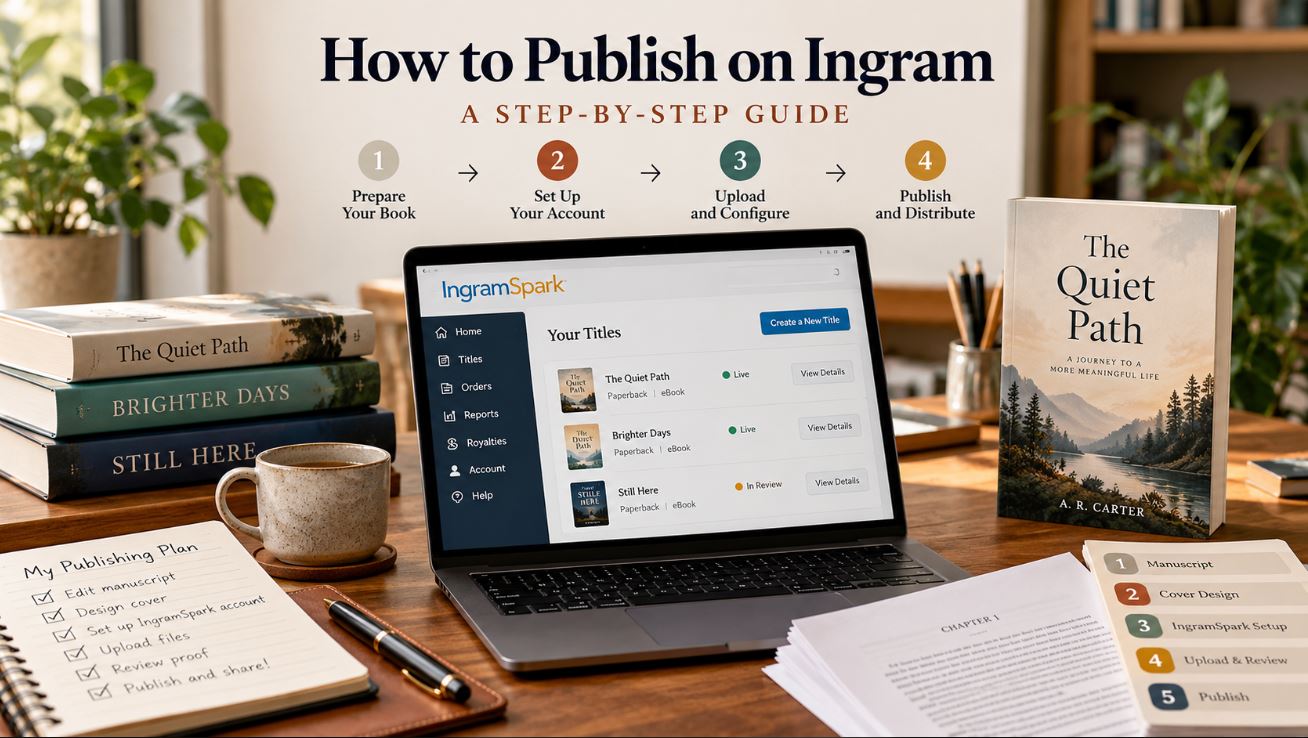
IngramSpark is Ingram’s self-publishing platform. It prints your book on demand (print on demand, so there’s no inventory to buy) and distributes it through Ingram’s network of more than 45,000 retailers, libraries, universities and educators, including Barnes & Noble, independent bookstores and Amazon. IngramSpark self-publishing takes six stages: choose your format, enter your title and ISBN, add your author details and description, pick your subjects, set your print specs and pricing, then upload your files and approve the proof.
This guide walks through every screen using a real book our team set up on IngramSpark in October 2026, so you can see exactly what each field looks like and what to put in it. Title setup is free, and from February 1, 2026, file revisions are free too, according to IngramSpark’s 2026 fee update.
What You Need Before You Publish on IngramSpark
You need a print-ready interior PDF, a print-ready cover PDF that includes the spine and back cover, an ISBN for each format, and your book’s description, categories and price decided before you start. Having all of this ready turns a two-day job into an hour.
- Interior PDF formatted for your exact trim size, with correct margins, gutter and 0.125-inch bleed if any image runs to the page edge.
- Cover PDF built on IngramSpark’s cover template for your trim size, paper and page count, so the spine width is right.
- EPUB file if you’re also publishing an ebook. It has to pass EpubCheck, the validator IngramSpark uses.
- ISBN for each format (paperback, hardcover and ebook each need their own).
- Title, subtitle and author bio, written the same way you’ll use them everywhere else.
- Book description (200 to 4,000 bytes) and a one-line short description (up to 250 bytes).
- Keywords, BISAC subjects and Thema subjects.
- Retail price for each market, plus your wholesale discount and returns choice.
If your files aren’t ready, our book formatting services prepare print and ebook interiors to IngramSpark’s specs, and our book design services handle covers built on the correct template, both with quick turnaround.
How to Publish a Book on IngramSpark: Step by Step With Screenshots
To publish on the IngramSpark self-publishing platform, log in to your IngramSpark dashboard, choose Add a Title, and work through each screen below in order. IngramSpark saves as you go, so you can leave and come back with Save & Exit.
Step 1: Choose Print, Ebook or Both
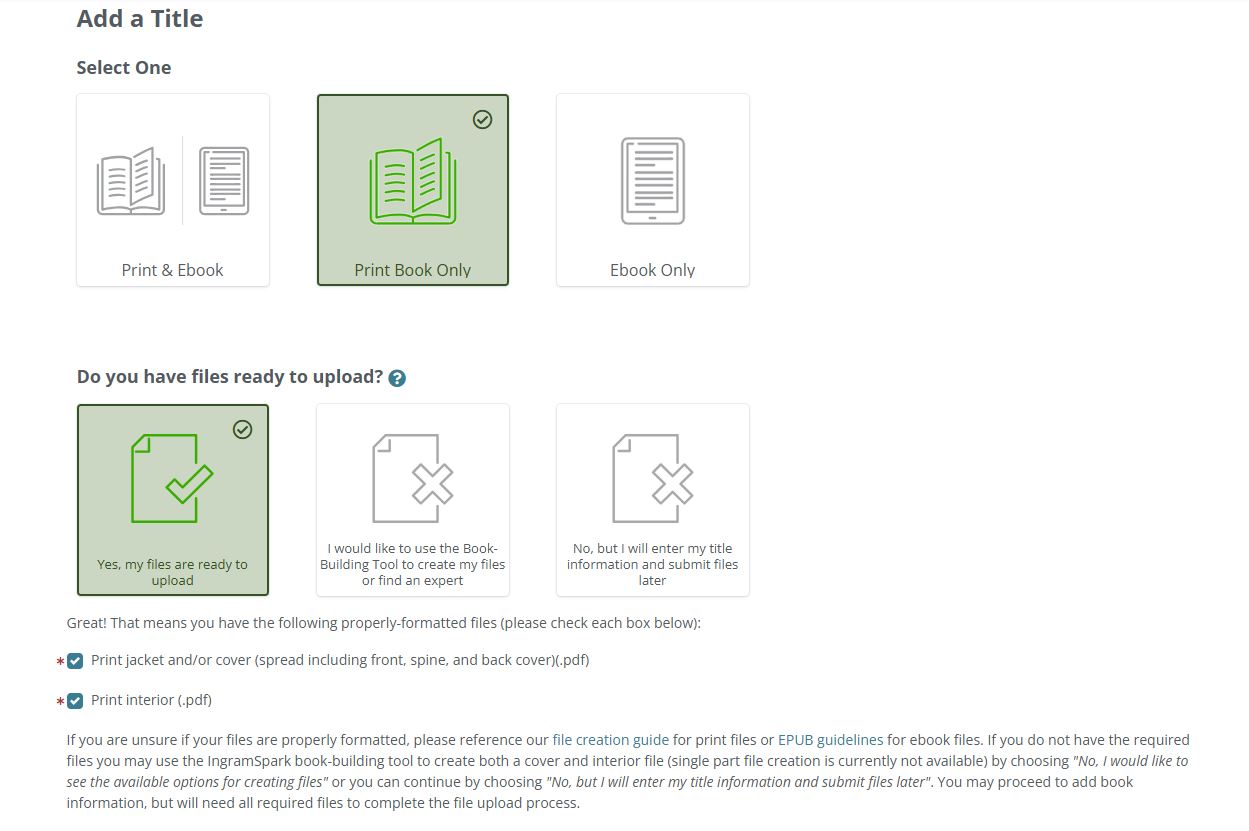
The first screen asks what you’re publishing: Print & Ebook, Print Book Only, or Ebook Only. Choose the format you have files for. Print books are made with IngramSpark print on demand, so copies are printed only when someone orders one. If you want your book distributed to stores and libraries, this is the path to take, since every title set up here goes into Ingram’s distribution program once you set pricing for at least one market.
Next, IngramSpark asks if your files are ready. Pick “Yes, my files are ready to upload” and tick both boxes confirming you have a print cover (front, spine and back as one spread) and a print interior PDF. Only tick them if the files really are formatted for your trim size. Otherwise you’ll hit errors at upload.
Step 2: Enter Your Title, ISBN and Publishing Rights
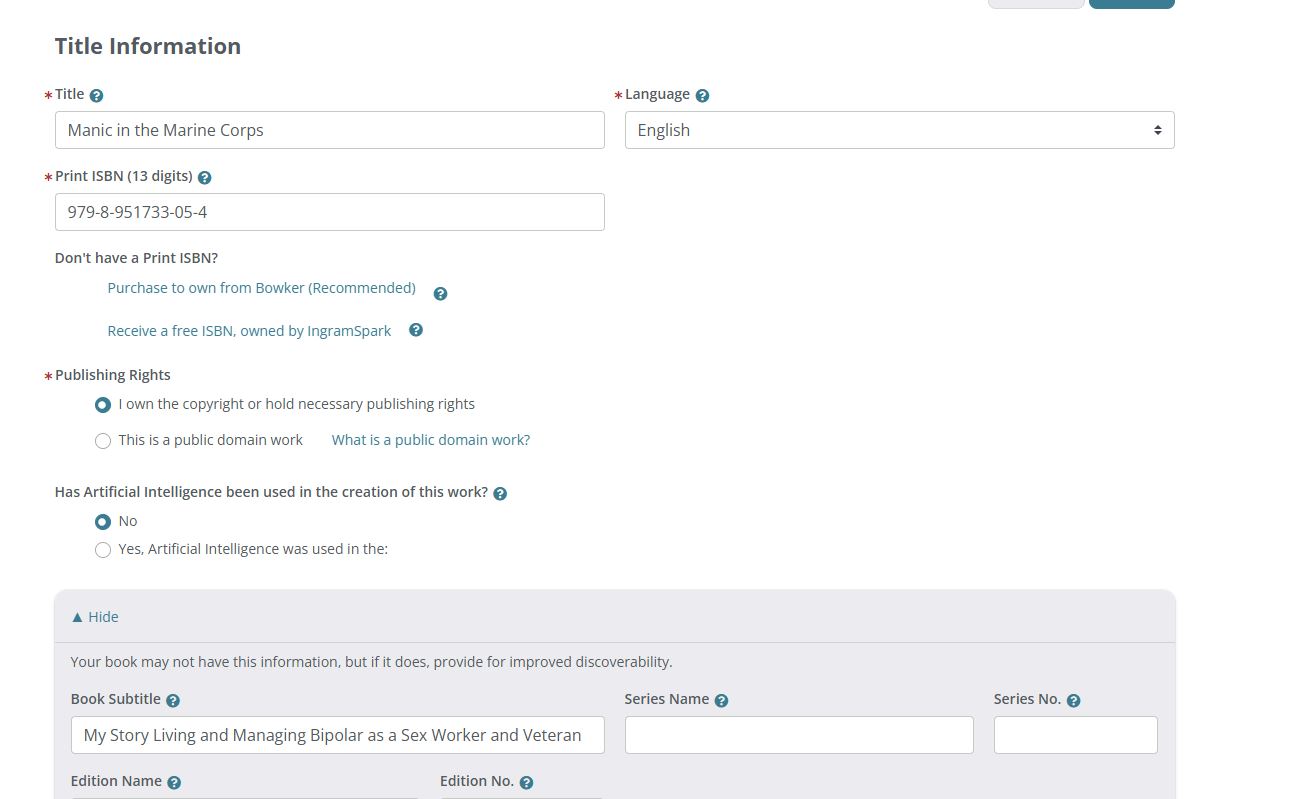
Enter your title exactly as it appears on the cover, with the first letter of each main word capitalized, then choose the language. Below that, enter your 13-digit print ISBN.
If you don’t have an ISBN, IngramSpark gives you two options:
- Free ISBN from IngramSpark. It costs nothing, but your book carries IngramSpark’s imprint, Indy Pub, instead of yours. The ISBN can only be used on IngramSpark, can’t be moved to another account, and free ISBNs are currently available in the U.S. only. Switching to your own ISBN later means setting the book up again as a new title.
- Buy your own from Bowker. IngramSpark recommends this. You own the ISBN, your own publisher name appears as the imprint, and you can use the same ISBN for the same edition on other platforms.
There is a third route if you’re working with a publishing company. At Writers of the West, books we publish carry our imprint and an ISBN dedicated to that title, and the author still keeps full ownership and all royalties. We’ve published hundreds of books this way, and an established imprint looks more credible to bookstores and reviewers than a personal one or Indy Pub.
Select “I own the copyright or hold necessary publishing rights,” then answer the AI question honestly. IngramSpark now asks whether artificial intelligence was used to create the work. Finally, open the extra section and add your subtitle. A subtitle that says what the book is about helps both readers and search.
Step 3: Add the Author, Location and Biography
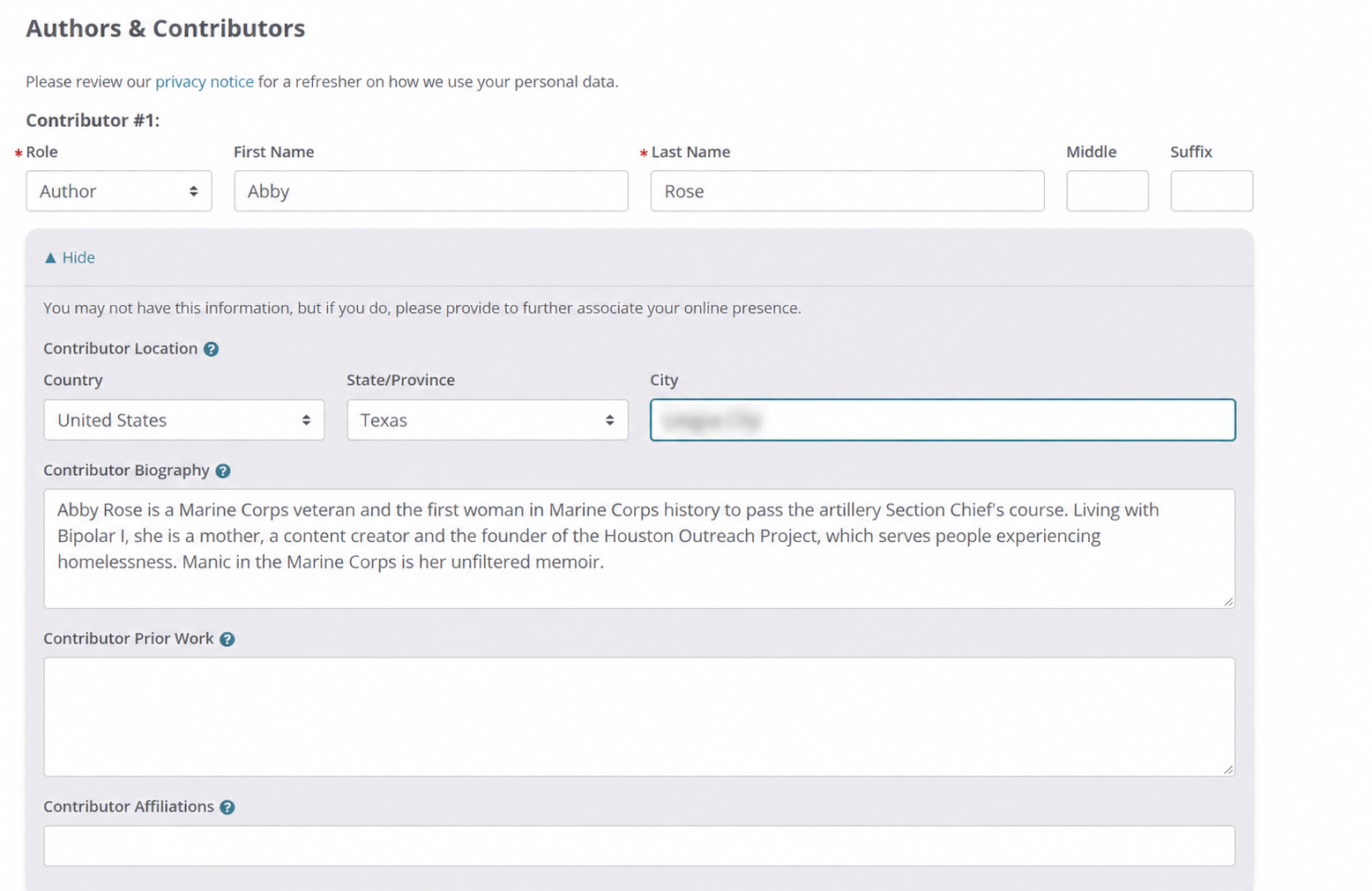
Choose the contributor role (Author, Editor, Illustrator and so on) and enter the name. Then open the optional section and fill in the country, state, city and biography. These fields are optional, but fill them in.
Write the author name and bio the same way here as on Amazon, Goodreads, your website and social profiles. Consistent details help search engines and AI tools connect your books to you as one author, which matters later if you want an author knowledge panel in Google.
Step 4: Choose Your Imprint and Write the Book Description
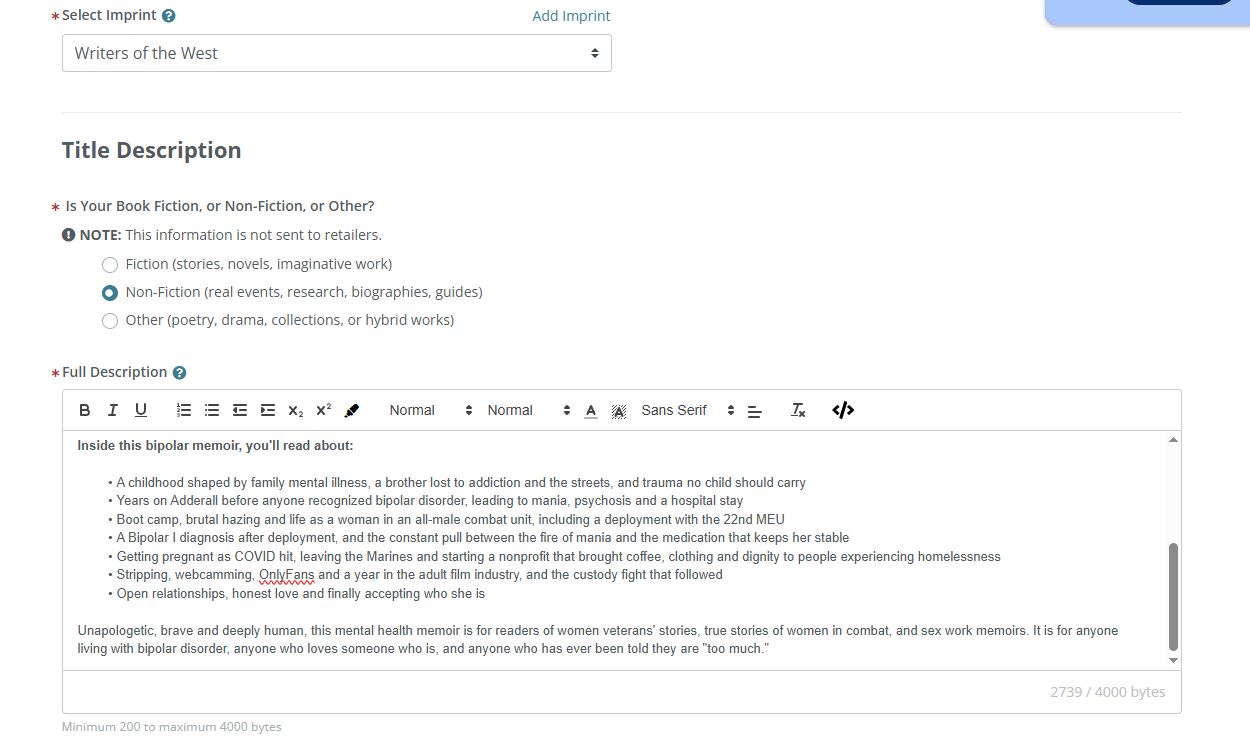
Select your imprint from the dropdown, or add one. Then mark the book as Fiction, Non-Fiction or Other. IngramSpark notes this choice isn’t sent to retailers, but it helps them process the title.
The full description is what readers see on retailer pages, so it’s the most important text you’ll write in this process. A few things make it work:
- Lead with a hook in the first two lines, because many store pages cut the description off there.
- Use the words readers search for. Publishers like us build descriptions from real keyword data, so terms people actually type, such as “bipolar memoir” or “women veterans’ stories,” appear naturally in the copy.
- Break it up with a short bulleted list of what’s inside.
- Have a person write it. AI-written descriptions tend to sound generic, and the description is your sales pitch.
Step 5: Add the Short Description, Audience, Keywords and BISAC Subjects
The short description is a one-line pitch of up to 250 bytes. Then choose your audience (Trade/General for most adult books) and enter keywords separated by semicolons. Use phrases readers type into a search bar, not single words.
BISAC subjects are the standard codes bookstores, wholesalers and libraries use to classify and shelve your book. Pick the most specific codes that honestly describe it rather than broad “General” ones, so the book is filed where its readers look.
BISAC codes are not the same as Amazon’s category rankings. On Amazon, bestseller ranks are earned inside Amazon’s own browse categories, which you choose and manage on the Amazon side. That’s where category research pays off: for the books we publish, we look for lower-competition Amazon categories where a title has a realistic chance of reaching the top of the list and getting seen.
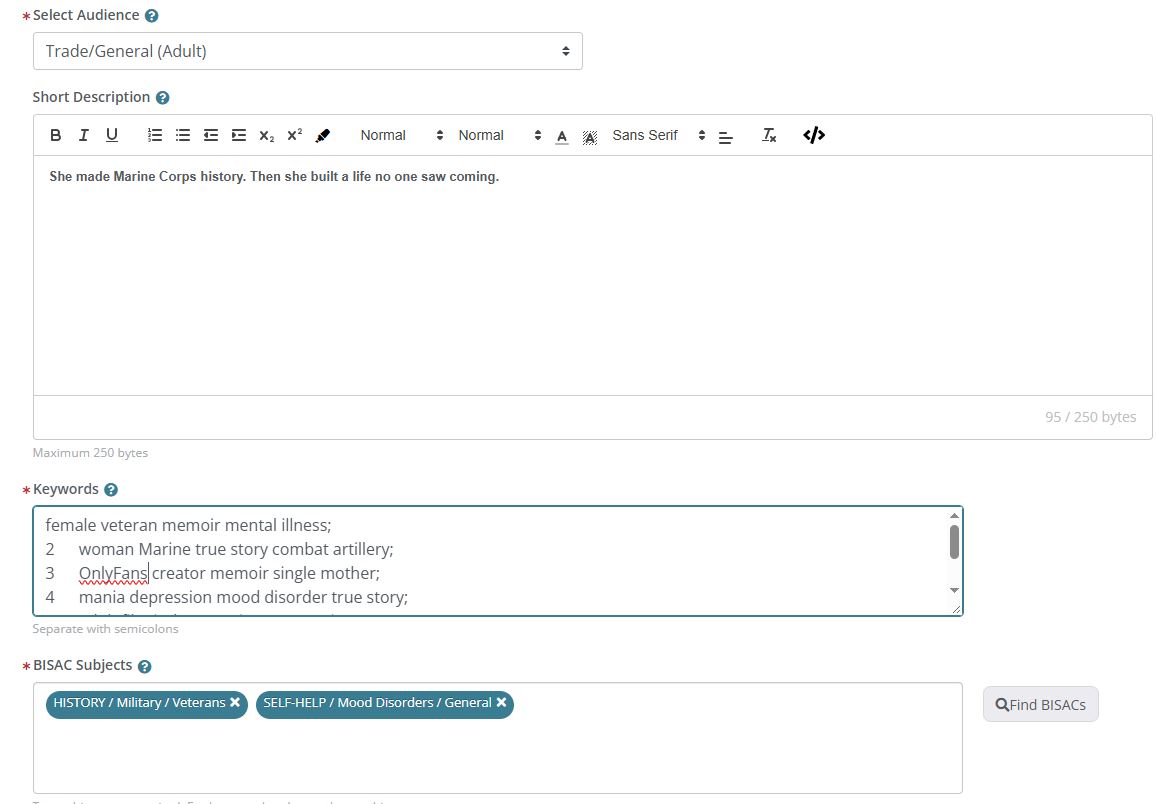
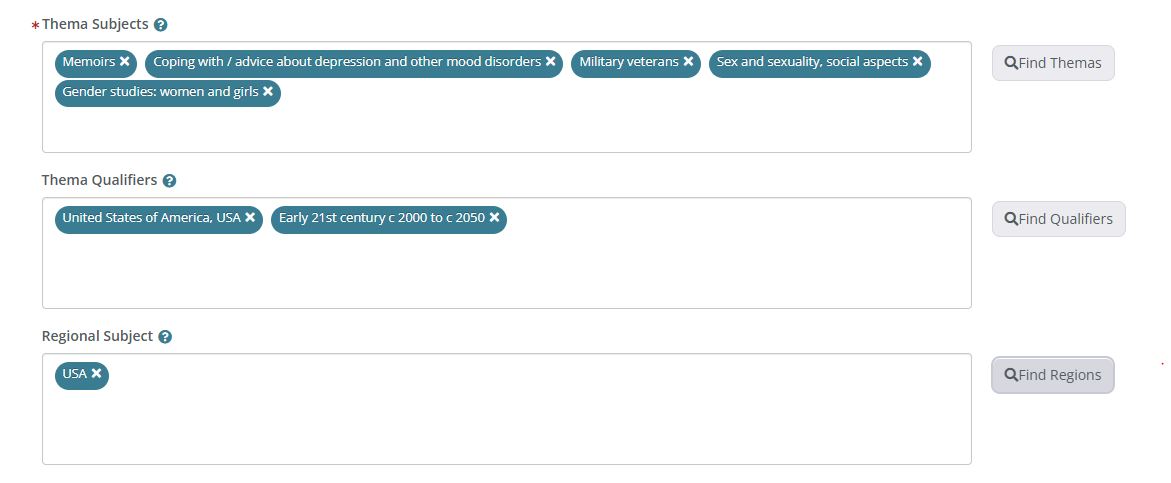
Step 6: Add Thema Subjects, Qualifiers and Regional Subject
Thema is the international subject system that retailers and libraries outside the U.S. use, much like BISAC. Add the subjects that match your book, then use qualifiers for place and time period and set a regional subject. For a memoir set in the U.S. today, that means “United States of America, USA” and the “Early 21st century” qualifier.
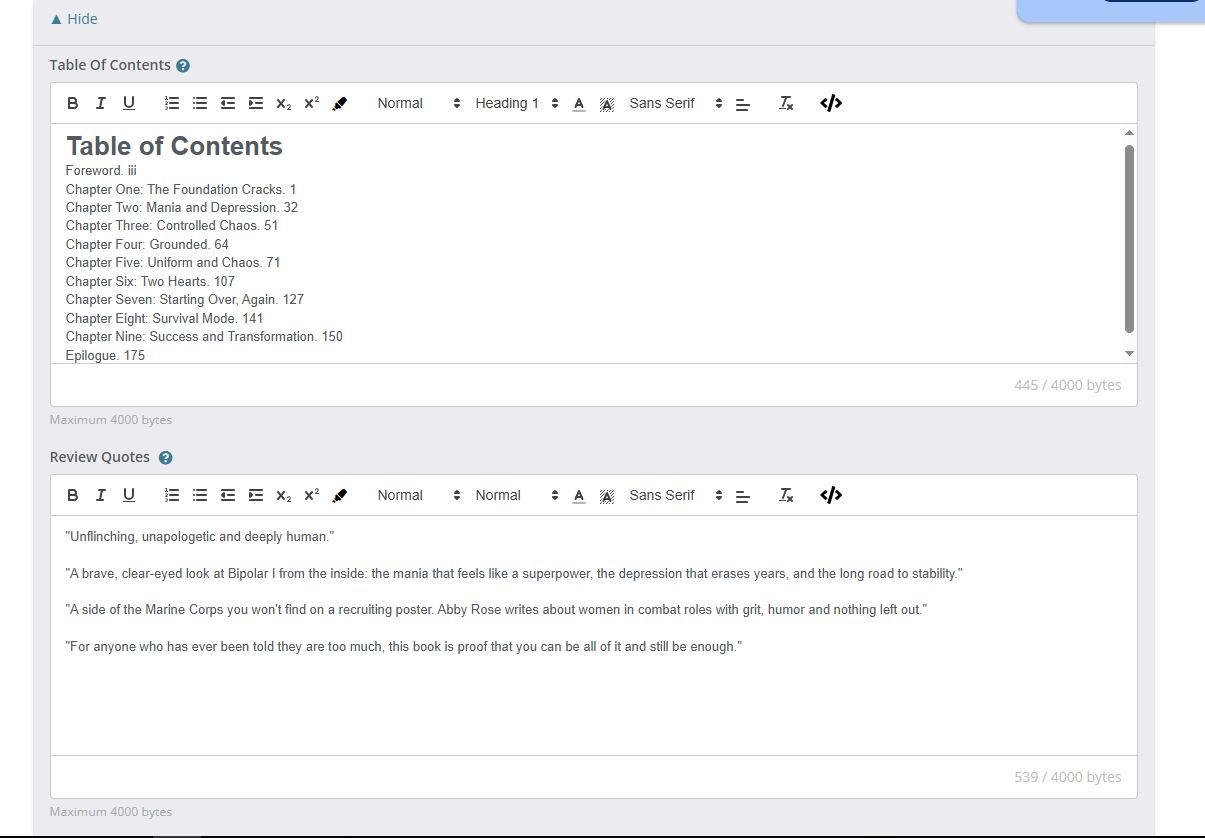
Step 7: Add the Table of Contents and Review Quotes
These optional fields feed retailer and library listings. Paste your table of contents and any editorial review quotes, up to 4,000 bytes each. Review quotes from credible sources are one of the easiest ways to make a listing look established.
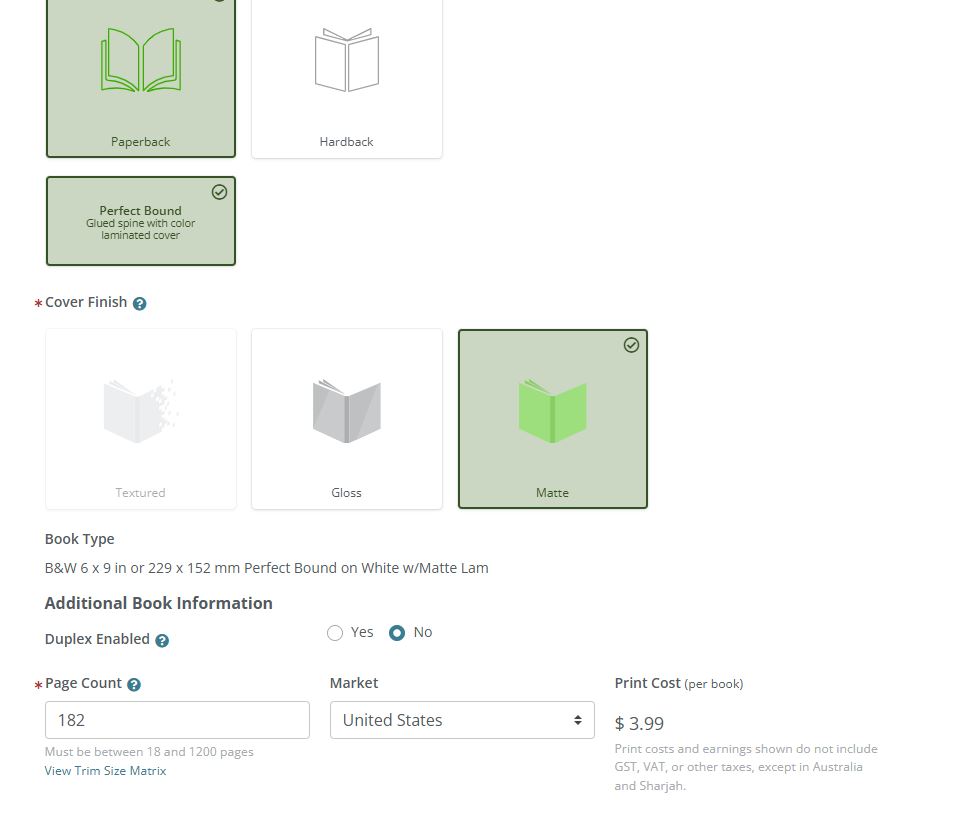
Step 8: Choose Trim Size, Paper, Binding and Cover Finish
Here you set the physical book: paperback or hardback, binding, cover finish, interior color and trim size. Your interior and cover files must match whatever you choose here.
- Trim size: 6 x 9 inches is the most common size for nonfiction and memoir, and 5.5 x 8.5 inches is common for fiction. Smaller trims mean more pages but usually a lower print cost per page.
- Interior: black and white is far cheaper than color. Only choose color if the book really needs it.
- Cover finish: matte feels premium and shows fewer fingerprints. Gloss makes colors pop and suits children’s books and bright designs.
- Page count: enter the exact count of your interior PDF. It must be between 18 and 1,200 pages, and it sets your spine width and print cost.
The print cost appears as soon as you enter the page count. In our example, a 182-page, 6 x 9 black-and-white paperback with a matte cover costs $3.99 per copy to print for the U.S. market.
Step 9: Set Your Price, Wholesale Discount and Returns
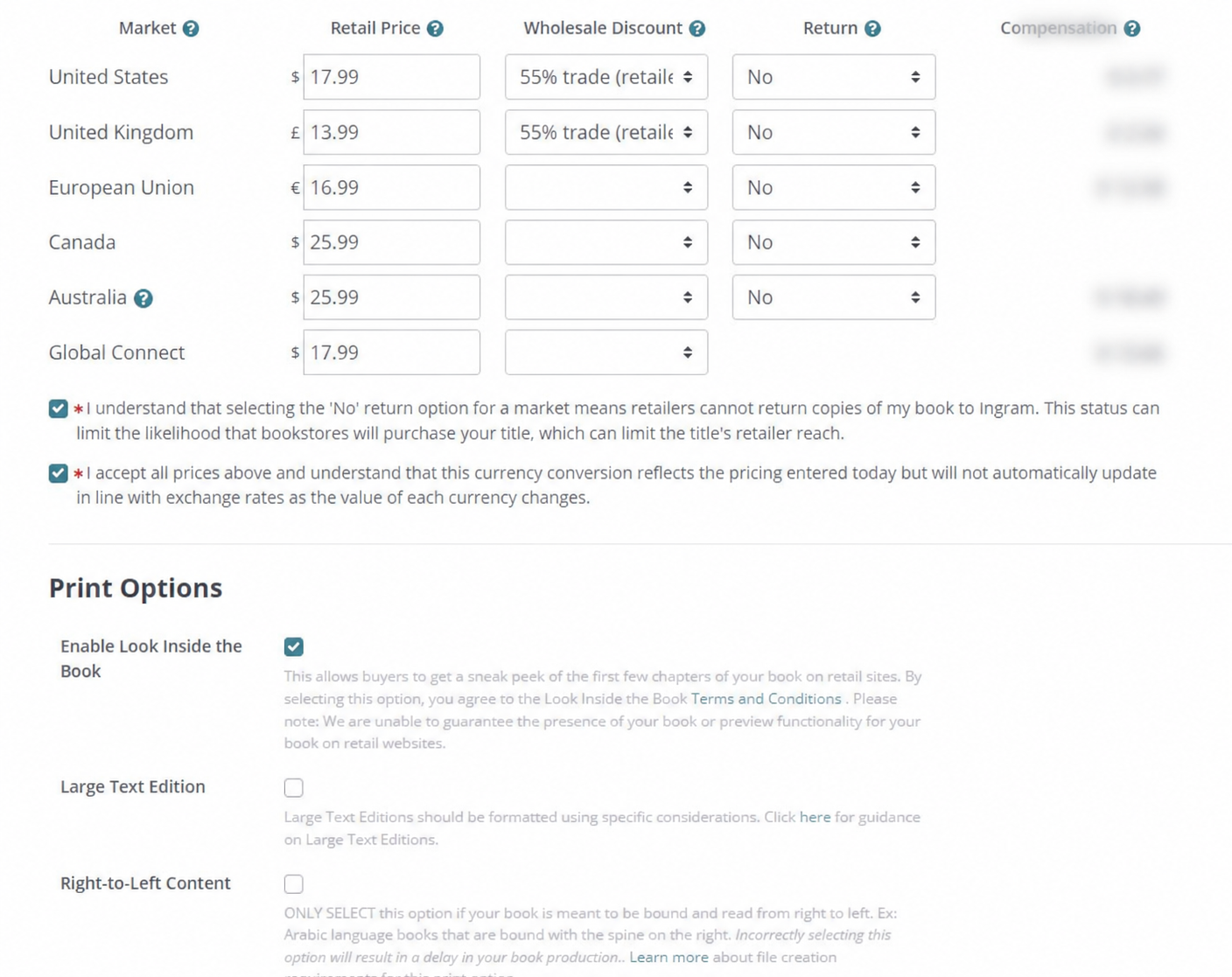
Set a retail price for each market, then a wholesale discount and a returns option. IngramSpark shows your compensation for each market as you go. Price the book so you earn something on every copy, but not so high that it stands out against similar books in your category.
How IngramSpark royalties (compensation) are calculated: list price, minus the wholesale discount, minus the print cost, minus a 1.875% distribution fee based on the list price, as set out in IngramSpark’s pricing guide. IngramSpark pays compensation 90 days after the end of the month the book shipped.
| Retail price | $17.99 |
|---|---|
| Wholesale discount (55%) | −$9.89 |
| Print cost | −$3.99 |
| Distribution fee (1.875% of list) | −$0.34 |
| You earn per copy | $3.77 |
Wholesale discount. IngramSpark recommends 55% in every market and accepts 40% as the minimum. In the U.S., anything under 53% counts as a short discount, and many bookstores won’t order short-discounted titles. A lower discount earns you more per copy but reaches fewer stores.
Returns. This choice decides whether bookstores will stock you:
| Returns option | What happens | Best for |
|---|---|---|
| No (non-returnable) | Retailers can’t send unsold copies back. You pay nothing for returns. | Authors selling mainly online who want no financial risk. |
| Yes – Destroy | Unsold copies are pulped. You’re charged the wholesale cost of each returned copy, with no shipping fee. Available in all markets except Global Connect. | Authors who want bookstore placement and can absorb some returns. |
| Yes – Deliver | Returned copies are shipped to you (U.S. only). You pay the wholesale cost plus $3 per book shipping to a U.S. address, or $20 per book outside the U.S. | Authors who want the copies back to sell at events. |
Returns can arrive at any time and are deducted from your earnings. Here’s what that means in real numbers. On our $17.99 example, the wholesale price is about $8.10 (the list price minus the 55% discount). Each returned copy is charged back at that $8.10, while each sale earns $3.77. One returned copy wipes out more than two ordinary sales.
If your strategy involves pitching physical bookstores, a 55% discount and a returnable setting make your book easier for stores to order. They don’t guarantee placement. Stores still order based on demand, local interest and your own outreach. If you’re selling mainly online, “No” removes the risk of chargebacks. Full details are in IngramSpark’s pricing guide.
Below pricing, tick “Enable Look Inside the Book” so buyers can preview the first pages on retail sites. Leave Large Text Edition and Right-to-Left Content unticked unless your book is formatted for them. Then choose your publication date.
Step 10: Upload Your Interior and Cover Files
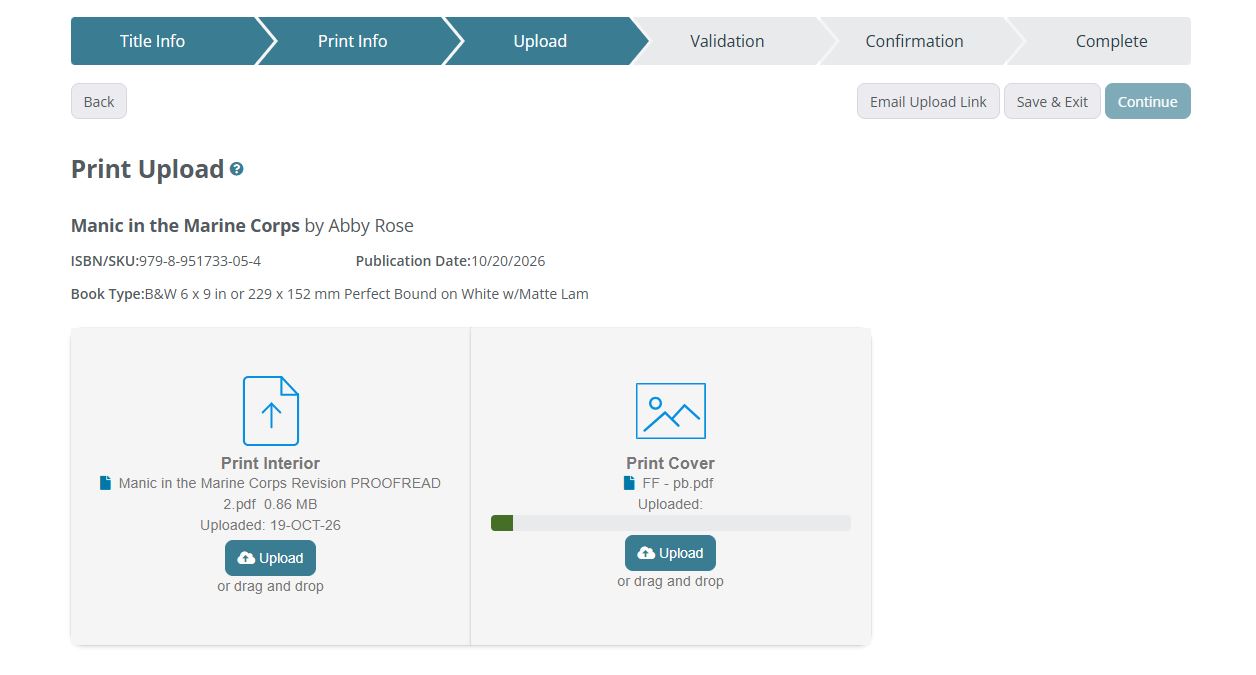
Upload the interior PDF on the left and the cover PDF on the right, then click Continue. The screen confirms your ISBN, publication date and book type, so check those one last time.
Step 11: Review File Validation Warnings
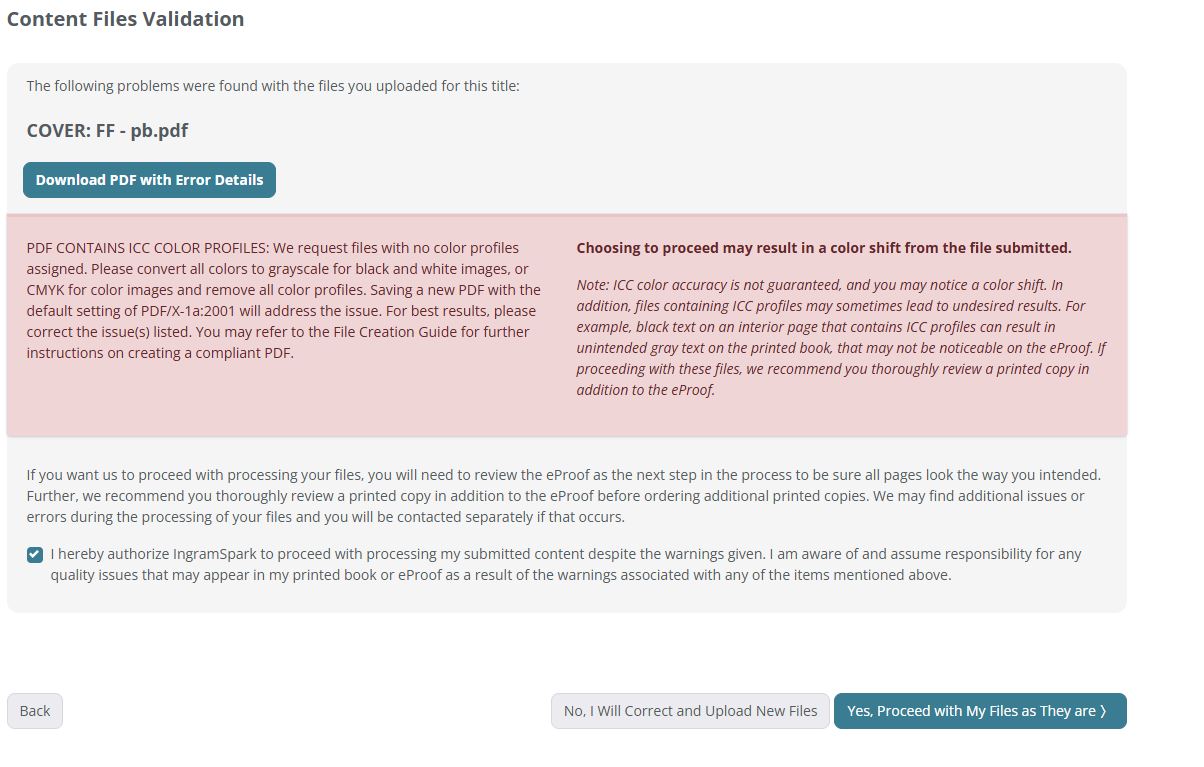
IngramSpark checks your files and lists any problems. Some are errors you must fix. Others are warnings you can accept. In our upload, the cover triggered an ICC color profile warning, a common message for authors who design covers in RGB tools. IngramSpark asks for files with no color profiles, saved as PDF/X-1a:2001, and warns that proceeding may cause a slight color shift.
The safest fix is to re-export the cover as PDF/X-1a:2001 (CMYK, with no color profiles) and upload it again. Revisions are free, so there’s no cost to getting it right. Many books do go through with this warning and print fine, but the eProof is a screen preview and won’t show a color shift. If you choose to proceed, order a printed proof and check the colors before buying copies in bulk.
Step 12: Approve the eProof and Submit
You can track every step from the IngramSpark self publishing dashboard. Once your files pass, IngramSpark generates an eProof, a digital preview of your printed book. Go through every page: margins, page numbers, images, the spine text and the barcode. When everything looks right, approve it. After approval, your title is processed and released through IngramSpark self publishing distribution to retailers and libraries. For the first print run, order one physical proof copy. It’s the only way to see the real colors, paper and binding.
Common IngramSpark File Errors and How to Fix Them
Most IngramSpark rejections come from a handful of problems: missing bleed, cover spine errors, files that don’t match the trim size, color profiles, and EPUB files that fail validation.
| Error | What causes it | How to fix it |
|---|---|---|
| Insufficient bleed | Cover or full-page images stop at the trim line. | Extend backgrounds at least 0.125 inches (3.2 mm) past the trim on every edge. |
| Spine width wrong | Cover built for a different page count or paper. | Rebuild the cover on IngramSpark’s Cover Template Generator using your final page count. |
| Interior doesn’t match trim size | PDF exported at the wrong page size. | Export the interior at the exact trim size you selected, with bleed only if images reach the edge. |
| Text or logos too close to the edge | Content outside the safety area. | Keep all text inside the safety margins shown on the template. |
| ICC color profiles | Images or the PDF carry embedded color profiles. | Export as PDF/X-1a:2001, with CMYK for color and grayscale for black and white. |
| EPUB validation errors | A bad ebook conversion leaves broken code, missing IDs or undeclared entities. | Fix the errors EpubCheck reports, or have the EPUB rebuilt properly. |
EPUB problems are the hardest to fix yourself, because the error messages refer to the code inside the file, such as mismatched language attributes, missing IDs or undeclared entities. They almost always come from converting a Word file with a quick online converter. If your ebook keeps failing, our ebook services and book formatting team can build a clean EPUB that passes EpubCheck, usually within about a week.
How Much Does IngramSpark Cost?
Setting up a title on IngramSpark is free, and since February 1, 2026, file revisions are free too. You pay the print cost when you order copies, and IngramSpark deducts a 1.875% distribution fee, based on the list price, from each sale it distributes.
- Title setup: free.
- Revisions: free from February 1, 2026.
- Distribution fee: 1.875% of the list price on distributed sales.
- Print cost: depends on trim size, page count, paper and binding. Our 182-page 6 x 9 paperback costs $3.99.
- ISBN: free from IngramSpark (U.S. only, with limits), or bought from Bowker.
Self-publishing on Ingram Spark is cheap at the platform level. The bigger costs for Ingram publishing books are the steps before upload. For a full picture of what publishing costs beyond the platform, including editing, design and marketing, see our breakdown of how much it costs to self-publish a book.
IngramSpark vs Amazon KDP: Should You Use Both?
Most self-published authors use both: Amazon KDP for sales on Amazon, and IngramSpark for bookstores, libraries and every other retailer. KDP is built for Amazon. IngramSpark is built for the rest of the book trade.
| IngramSpark | Amazon KDP | |
|---|---|---|
| Best for | Bookstores, libraries and wide retail distribution | Selling on Amazon |
| Bookstore and library reach | Ingram’s network of 45,000+ retailers and libraries | Limited; stores rarely order from KDP |
| Returns option | Yes, which stores usually require | No |
| Hardcover | Yes, including case laminate and dust jacket | Yes, more limited options |
| Setup cost | Free | Free |
If you use both, buy your own ISBNs so the same edition can carry the same ISBN on both platforms, and turn off KDP’s Expanded Distribution for the paperback so the two don’t compete for the same stores. For the Amazon side, see our step-by-step guide to publishing on Amazon KDP, or compare other Amazon KDP alternatives.
Is IngramSpark Good for Self-Publishing? IngramSpark Pros and Cons
Yes, if you want your book in bookstores and libraries. IngramSpark is the most direct way for a self-published author to reach Ingram’s distribution network. It’s less useful if you only plan to sell on Amazon.
Pros
- Reaches bookstores, libraries, universities and online retailers worldwide.
- Lets you set returns and a full trade discount, which bookstores expect.
- Free title setup and, from 2026, free revisions.
- Hardcover and a wide range of trim sizes and finishes.
Cons
- Strict file requirements, so badly formatted files get rejected.
- Earnings per copy are lower at a 55% discount than on Amazon.
- Returns can cost you money if stores send copies back.
- Being available to bookstores doesn’t mean they’ll stock your book. You still need marketing.
Ingram Publishing Services: Doing It Yourself vs Working With a Publisher
You can handle Ingram book publishing yourself for free. Many authors still prefer publishing with Ingram Spark through an experienced Ingram publishing company when they want the book prepared and positioned by people who do this every day, from formatting and covers to categories, keywords and the description.
Writers of the West handles Ingram publishing for authors, putting their books into Ingram’s distribution network as part of our self-publishing services. When we publish your book, we handle:
- Interior formatting and cover design built to IngramSpark’s specifications.
- An ISBN dedicated to your book under the Writers of the West imprint.
- Keyword-researched descriptions and lower-competition category selection.
- Pricing, discount and returns settings matched to your goals.
- Distribution on IngramSpark, Amazon and other platforms.
You keep the copyright and full ownership of your book from day one, and we take no share of your royalties. The ISBN is registered under the Writers of the West imprint but dedicated to your title alone. See how we position books to compete for #1 on Amazon for the research behind it.
IngramSpark FAQs
Is Ingram Spark the same as IngramSpark?
Yes. The official name is IngramSpark, written as one word, but authors often search for Ingram Spark self publishing, Ingram Sparks publishing or simply Ingram self publishing. They all refer to the same platform from Ingram Content Group.
Is IngramSpark legit? What do Ingram publishing reviews say?
Yes. IngramSpark is the self-publishing platform of Ingram Content Group, one of the largest book distributors in the world. It’s the same network that supplies bookstores and libraries with books from traditional publishers. Author reviews generally praise its distribution reach and criticize its strict file requirements, which is why clean, correctly formatted files matter.
What is the difference between IngramSpark and Lightning Source (Ingram Publishing)?
Both belong to Ingram. Lightning Source is Ingram’s print-on-demand and distribution service for established publishers. IngramSpark is the version built for self-publishers and small presses, with a simpler setup.
Is IngramSpark free to use?
Title setup is free, and from February 1, 2026, revisions are free too. You pay print costs when you order copies, and IngramSpark takes a 1.875% distribution fee from distributed sales.
Can I use IngramSpark’s free ISBN on Amazon?
No. IngramSpark’s free ISBN can only be used on IngramSpark, and the book carries IngramSpark’s Indy Pub imprint. To use one ISBN on both IngramSpark and Amazon KDP, buy your own from Bowker.
How much do authors earn on IngramSpark?
Your earnings per copy are the list price minus the wholesale discount, the print cost and the 1.875% distribution fee. A 182-page paperback priced at $17.99 with a 55% discount earns about $3.77 per copy in the U.S. IngramSpark pays 90 days after the end of the month the book shipped.
Should I make my book returnable on IngramSpark?
If you want bookstores to stock your book, yes. Most stores won’t order non-returnable titles. If you mainly sell online, choosing “No” avoids the cost of returns.
Can I change my files after publishing on IngramSpark?
Yes. You can upload revised interior or cover files, and revisions are free for all IngramSpark customers from February 1, 2026.
What is the Ingram publishing phone number or customer service contact?
The fastest route is the IngramSpark Help Center at help.ingramspark.com, where you can search answers and submit a request to the support team. Using the help center also means your request is tied to your account and title.
Can someone handle self publishing on IngramSpark for me?
Yes. A publishing company can set up and manage your title on Ingram’s network. Writers of the West handles the full process, from formatting and cover design to distribution, while you keep all rights and royalties. See our self-publishing services.
About the Author
Senior Editor, Writers of the West
Francis Vincent is a best-selling
American author and senior editor at Writers of the West. He holds both a B.A. and M.A. in English Literature, with graduate work at the University of Colorado Boulder. His editorial specialization spans productivity, habits, line editing, and dialogue refinement. He focuses on clarity, flow, and practical structure — helping authors translate ideas into polished, publishing-ready manuscripts while preserving their voice and intent.
writersofthewest.net ·
Professional Ghostwriting Services, Book Editing & Publishing Guidance