
Introduction
If you’re wondering how to create a journal to sell on Amazon, you’re in the right place. Selling journals through Amazon’s print-on-demand platform remains one of the simplest ways to start a publishing business in 2026. No inventory. No shipping. No upfront printing costs.
This guide walks you through niche selection, formatting requirements, interior design, cover creation, and strategic publishing so you can launch with clarity instead of guesswork.
By the end, you’ll understand the exact process from idea validation to listing optimization.
Quick Answer: How to Create a Journal to Sell on Amazon
If you want a concise overview of how to create a journal to sell on Amazon, follow these essential steps:
- Choose a profitable journal niche with proven demand
- Select the correct trim size and page count for KDP
- Design your interior pages in PDF format
- Create a print-ready cover using KDP specifications
- Upload your journal to Amazon KDP
- Optimize your title, keywords, and categories
- Publish and promote your journal for visibility
This is the complete framework. Below, we break down each step in detail so you understand not just what to do, but how to sell on Amazon KDP strategically.
Step 1: Choose a Profitable Journal Niche in 2026
Before designing anything, validate demand.
A strong design in a weak niche will not sell.
An average design in a strong niche can.
Amazon is demand-driven. Your goal is not creativity first. It is alignment with buyer intent.
What Makes a Journal Niche Profitable?
Look for:
- Clear audience targeting
- Consistent search demand
- Moderate competition
- Room for differentiation
“Daily journal” is too broad.
“Daily anxiety journal for college students” is focused.
Specificity improves discoverability and conversion.
How to Research Niches on Amazon
- Use Amazon Autocomplete
Type:
journal for
planner for
gratitude journal for
Autocomplete suggestions reflect real buyer searches. Document recurring phrases.
2. Analyze Best Seller Rank
Open top listings and check:
- Best Seller Rank
- Number of reviews
- Cover quality
- Title clarity
If several listings show steady reviews and strong rankings, demand exists.
If only one dominates, competition may be concentrated.
3. Read Reviews for Gaps
Look for comments like:
- Needs more space
- Layout feels cramped
- Not enough prompts
Improving an existing concept often works better than inventing a new one.
Avoid Saturated Generic Niches
Highly competitive categories include:
- Basic lined journals
- Generic gratitude journals
- Broad planners
Instead, narrow your focus:
- Fitness journal for beginners
- Guided gratitude journal for teens
- Pregnancy journal for first-time mothers
- Reflection journal for entrepreneurs
Micro-niching increases visibility.
Seasonal vs Evergreen
Evergreen niches sell year-round:
- Mental health journals
- Productivity planners
- Fitness trackers
Seasonal niches spike during specific periods:
- Back-to-school planners
- Christmas journals
- Wedding planners
A balanced catalog can include both.
Final Validation Questions
Before designing, confirm:
- Are at least 5 books under 100,000 BSR?
- Do covers look professional?
- Can you improve targeting or layout?
- Is the audience clear from the title alone?
Validate first. Design second.
The right niche determines whether your journal becomes an asset or disappears.
Case Study
A first-time publisher reached out to us after two months of silence. Three journals uploaded, zero sales. She wasn’t doing everything wrong. The designs were clean, the formatting was correct. But every journal was chasing a broad audience that Amazon was already flooded with.
We sat down with her and looked at who she actually wanted to reach. Turns out she had real insight into three very specific groups. Women navigating sobriety, first-year teachers trying to stay grounded, and older adults just starting a fitness routine. Those weren’t the journals she had published. She had published “daily journal,” “gratitude journal,” and “fitness tracker.”
So we rebuilt from there. New titles written around how those buyers actually search. Backend keywords replaced with intent-driven phrases. Covers redesigned to read clearly at thumbnail size, no decorative fonts, no busy backgrounds, just clarity.
The first sale came in week two. By the end of month three, the sobriety journal was pulling 4 to 6 sales a day and sitting under 80,000 BSR in its subcategory. The other two were moving steadily as well.
Nothing about the interior content changed. The positioning did. That is what made the difference.
Step 2: Choose the Right Size and Format for Amazon KDP
After validating your niche, focus on technical precision. Formatting errors are one of the fastest ways to get rejected or look unprofessional.
If your file does not meet KDP requirements, your journal will either be declined or look poorly printed.
Let’s simplify this.
What Trim Size Should You Choose?
Trim size refers to the final printed dimensions of your journal.
The most popular journal sizes on Amazon KDP are:
- 6 x 9 inches
- 7 x 10 inches
- 5 x 11 inches
When to Use Each Size
6 x 9 inches
Best for portable journals, daily reflections, niche journals for teens, and minimalist layouts.
7 x 10 inches
Balanced option. Offers more writing space without feeling oversized.
8.5 x 11 inches
Ideal for planners, fitness trackers, workbooks, and guided journals with prompts.
Before finalizing your size, study top competitors in your niche. Align with what buyers already expect.
Minimum and Ideal Page Count
Amazon KDP requires a minimum of 24 pages for paperback books.
However, most successful journals range between:
- 100 to 150 pages
Why?
Buyers associate thicker journals with better value. A 24-page journal looks thin and low quality unless intentionally marketed as a short workbook.
Page count also affects:
- Spine width
- Printing cost
- Retail pricing
- Royalty margin
More pages increase printing cost, so balance perceived value with profitability.
Understanding Bleed vs No Bleed
When learning how to create a journal to sell, understanding bleed is critical.
Bleed means your design extends to the edge of the page.
No bleed means there is a white margin around the page.
Choose bleed if:
- You have full-page designs
- Background colors extend to edges
- Decorative borders touch the edge
Choose no bleed if:
- You are using simple lined interiors
- Your layout stays within margins
Bleed requires slightly different margin settings and PDF export settings, so decide early.
Margin Requirements for KDP Interiors
Amazon requires safe margins to prevent text from being cut during printing.
For most journals:
- Outside margins: at least 0.25 inches
- Inside margin: varies depending on page count
- Top and bottom margins: minimum 0.25 inches
The inside margin increases as page count increases. This prevents content from disappearing into the spine.
Always use the official KDP interior template to avoid errors.
File Format Requirements
To properly execute creating a journal to sell on Amazon, your interior must be uploaded as:
- Print-ready PDF
- Correct trim size
- Embedded fonts
- Flattened layers
- No crop marks
Common mistakes that lead to rejection:
- Uploading Canva share links instead of exported PDFs
- Incorrect page dimensions
- Non-embedded fonts
- Low-resolution images
Export at 300 DPI for best print quality.
Cover Size and Spine Calculation
Your cover dimensions depend on:
- Trim size
- Page count
- Paper type
Amazon provides a Cover Calculator tool. Always generate a custom template for your specific page count.
The formula includes:
Front cover width + back cover width + spine width + bleed area.
Never guess spine width. Even small miscalculations cause upload errors.
ISBN and Publishing Settings
Amazon provides a free ISBN for paperback journals. You do not need to purchase one unless you want expanded distribution outside Amazon.
For beginners focusing on how to sell on Amazon KDP, the free ISBN is sufficient.
Final Technical Checklist Before Upload
Before moving forward:
- Confirm trim size matches interior PDF
- Confirm page count is correct
- Confirm bleed setting matches your design
- Confirm margins meet KDP requirements
- Confirm cover matches calculated template

Technical precision improves approval speed and reduces revision cycles. If you want a professional eye to look over your book, you can get help from top Amazon Kindle Direct publishing services and avoid beginner mistakes.
Step 3: Design a Journal Interior That People Actually Use
Once your niche and formatting are set, the next critical layer is interior design.
Your journal layout determines usability, perceived value, and review quality. A poorly structured interior reduces satisfaction, even if your niche research was solid.
Design is not about decoration. It is about clarity, structure, and writing space.
Let’s design this properly.
First Rule: Stop Overdesigning
You are not designing wall art.
You are creating something people need to write in.
That means:
- Clean lines
- Comfortable spacing
- No visual clutter
- No decorative overload
Minimal works.
Crowded layouts frustrate.
When building a journal for Amazon KDP, usability always beats decoration.
Step 1: Define the Structure Clearly
Before opening Canva or any design software, answer:
- Is this a blank lined journal?
- A guided reflection journal?
- A fitness tracker?
- A niche-specific mindset journal?
Each format requires a different layout system.
A guided journal needs prompts.
A tracker needs structured fields.
A reflection journal needs generous open space.
If the interior does not match the promise of your title, expect poor reviews.
Step 2: Use the Right Tool, the Right Way
You do not need expensive software.
Canva works.
PowerPoint works.
Google Slides works.
What matters is setup precision.
If you are using Canva:
- Set exact trim dimensions from the beginning
- Add margin guides
- Create one master page
- Duplicate consistently
- Export as high-quality PDF
Do not resize later. That is how formatting errors creep in.
Step 3: Respect Writing Space
Your buyer is paying for space to think.
Keep:
- Generous inside margins
- Clean outside margins
- Balanced top and bottom spacing
- Comfortable line height
Amazon trims slightly during printing. Tight margins look unprofessional.
Many creators trying to sell on Amazon KDP underestimate this. The result is journals that feel cramped.
Professional spacing signals quality instantly.
Step 4: Choose Fonts That Feel Trustworthy
Avoid script-heavy or decorative fonts.
Stick to:
- Garamond
- Lora
- Open Sans
- Playfair Display
Readable fonts reduce friction. Reduced friction increases satisfaction. Satisfaction increases positive reviews.
Simple typography wins long term.
Step 5: Create Logical Flow
Strong journals guide the user naturally.
For example:
Start with a short introduction.
Add a simple “How to Use This Journal” page.
Move into structured daily or weekly content.
End with reflection pages.
Structure improves completion rates.
Completion improves perceived value.
That is how journals gain traction over time.
Step 6: Design for Scalability
Think beyond one product.
A strong layout can become:
- Teen version
- Entrepreneur version
- Student edition
- Seasonal edition
If you want to build a real catalog instead of one isolated listing, design repeatable systems.
This is how serious creators grow sustainable journal portfolios.
Interior Mistakes That Quietly Kill Sales
Avoid:
- Inconsistent spacing
- Misaligned elements
- Overcrowded prompts
- Low-resolution graphics
- Margin violations
These details seem small.
They are not.
Buyers may not explain what feels wrong. They simply will not reorder.
Final Interior Standard
Before moving to cover design, confirm:
- Trim size matches your interior PDF
- Margins comply with KDP requirements
- Page count is intentional
- Fonts are embedded
- Export is 300 DPI
The goal is not to upload quickly.
The goal is to create a journal that feels professionally produced and worth keeping.
Step 4: Design a Cover That Actually Gets Clicked
Your journal does not compete with books.
It competes with thumbnails.
Inside Amazon search results, your cover appears small. Buyers scroll fast. If your design is unclear at thumbnail size, it will not get clicked.
No clicks means no ranking.
Let’s focus on what actually matters.
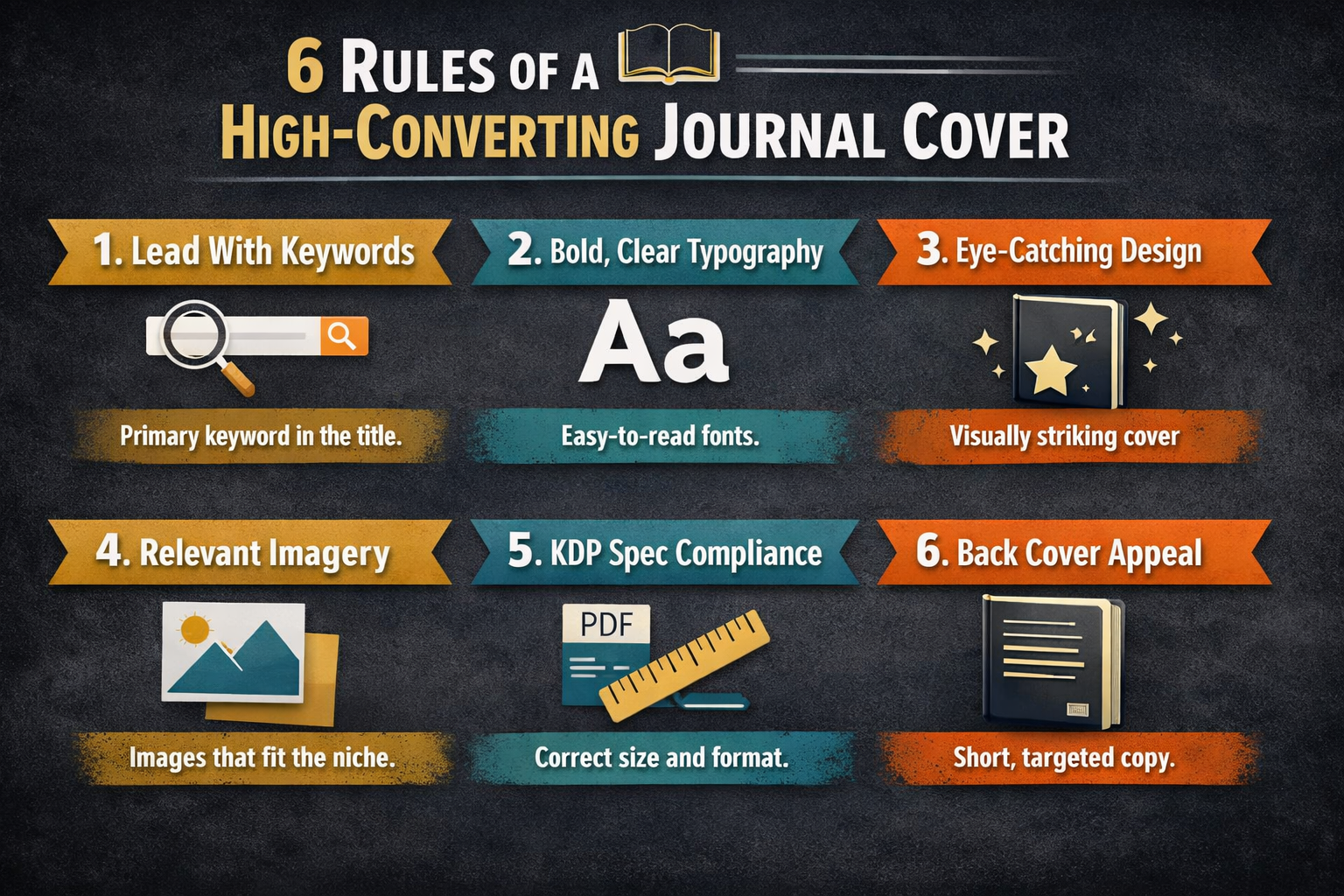
Rule 1: Design for Thumbnail View, Not Full Size
Open Amazon. Search your niche. Zoom out mentally.
That is your real competition.
Your cover must:
- Be readable at small size
- Use high contrast colors
- Have bold, clear typography
- Avoid overcrowded design
If someone cannot read the title in one glance, it fails.
Minimal and bold beats complex and pretty.
Rule 2: Match the Niche Expectations
Study the top 10 results in your category.
Look for patterns:
- Dark backgrounds vs light
- Script fonts vs serif
- Illustration-heavy vs text-focused
You are not copying.
You are aligning with buyer expectations while improving clarity.
If every top journal uses pastel tones and soft fonts, a black aggressive cover may confuse the audience.
Visual alignment improves conversion rate.
Rule 3: Use the KDP Cover Calculator Properly
Never guess your cover size.
Amazon provides a Cover Calculator tool. Use it.
Your dimensions depend on:
- Trim size
- Page count
- Paper type
The template will generate:
- Front cover
- Back cover
- Spine width
- Bleed area
Even a small spine miscalculation can cause upload errors.
Precision here prevents rejection.
Rule 4: Typography Is More Important Than Graphics
Many beginners think graphics sell journals.
In reality, clarity sells journals.
Your title should:
- Be large
- Be legible
- Be easy to understand in one second
Avoid:
- Thin fonts
- Overly decorative script
- Text placed over busy images
If you want long-term success selling journals on Amazon, your cover must communicate instantly.
Clear message wins.
Rule 5: Subtitles Should Add Specificity
Generic title: Daily Journal
Stronger title: Daily Mindset Journal for Entrepreneurs
Specificity increases discoverability.
It also improves search alignment inside Amazon.
Clear audience targeting improves conversion rate, which indirectly strengthens ranking. You can also get assistance from any of the best book design services to avoid making any mistakes that could cost you later.
Rule 6: Back Cover Strategy
Most low-content creators ignore the back cover.
That is a mistake.
Use the back to:
- Add a short benefit statement
- Reinforce who the journal is for
- Include a simple design element for cohesion
It does not need a long description. It needs clarity.
Common Cover Mistakes That Kill Clicks
Avoid:
- Too many fonts
- Low contrast colors
- Overused stock graphics
- Titles that blend into background
- Poor spine alignment
These mistakes reduce click-through rate. Reduced click-through rate lowers visibility over time.
Amazon rewards listings that convert.
Final Cover Checklist
Before uploading:
- Thumbnail is readable
- Title is clear and specific
- Spine width matches page count
- Cover matches interior trim size
- Design aligns with niche expectations
A strong cover improves:
- Click-through rate
- Conversion rate
- Early sales velocity
And early velocity improves ranking inside Amazon search.
Step 5: Upload Your Journal to Amazon KDP the Right Way
You can design a perfect interior and a strong cover, but if your upload settings are sloppy, your listing will struggle.
Publishing is not just file submission.
It is positioning.
Let’s walk through this carefully.
Step 1: Create Your KDP Account
Go to Kindle Direct Publishing and sign in using your Amazon account.
Set up:
- Author or publisher name
- Payment details
- Tax information
This is straightforward, but incomplete tax forms delay royalties. Handle it properly from the beginning.
Step 2: Enter Your Book Details Strategically
This is where many beginners lose visibility.
When filling in your listing:
Title and Subtitle
Be clear and specific.
Instead of: Daily Journal
Use: Daily Mindset Journal for Entrepreneurs
Specific titles align better with search intent and convert better.
Avoid stuffing keywords into the subtitle. It looks spammy and reduces trust.
Description Section
Your description should:
- Explain who the journal is for
- Highlight benefits
- Mention page count
- Clarify format
Structure it with short paragraphs and bullet points for readability.
Amazon buyers skim. Make it easy.
Step 3: Choose Keywords Wisely
Backend keywords matter more than most beginners realize.
If you want to understand how to sell on Amazon KDP effectively, this is where ranking begins.
In the seven backend keyword boxes:
- Avoid repeating your title
- Do not repeat category names
- Use long-tail variations
- Focus on buyer intent phrases
Think in phrases, not single words.
For example: anxiety journal for teens
daily reflection journal for students
fitness progress log book
These signals help Amazon understand who your product is for.
Step 4: Select Categories Strategically
Do not just choose “Journals.”
Look deeper.
Browse categories inside Amazon and identify subcategories with:
- Clear audience targeting
- Manageable competition
- Consistent demand
Category placement affects visibility dramatically.
Smaller, focused categories often provide better ranking opportunities.
Step 5: Upload Interior and Cover Files
Now upload:
- Interior PDF
- Cover PDF
After upload, use the preview tool carefully.
Check:
- Margin alignment
- Page order
- Spine placement
- Bleed accuracy
Do not rush this step. Fix issues before publishing.
Step 6: Set Pricing Intelligently
Pricing impacts both royalty and conversion.
Lower pricing:
- Increases early sales
- Improves velocity
Higher pricing:
- Increases per-unit royalty
- Requires stronger perceived value
For new listings, competitive pricing often helps gain traction faster.
You can adjust later.
Final Pre-Publish Checklist
Before clicking publish, confirm:
- Title is clear and specific
- Keywords are optimized
- Categories are targeted
- Files preview correctly
- Pricing aligns with niche standards
Publishing is not a technical formality.
It is a positioning decision.
Strong metadata improves discoverability.
Strong discoverability improves sales.
Sales improve ranking.
Step 6: How to Gain Traction and Actually Sell Your Journal
Uploading a journal is easy.
Getting consistent sales is not.
Most beginners think publishing equals profit. It does not. Visibility must be earned.
If you want real results selling journals on Amazon, you need momentum. Momentum creates ranking. Ranking creates sales.
Let’s break this down.
1. Your First 30 Days Matter More Than You Think
Amazon’s algorithm pays attention to early performance.
During the first month, focus on:
- Driving initial traffic
- Getting early reviews
- Encouraging consistent sales
Even small daily sales signal activity.
No activity signals irrelevance.
2. Optimize Your Listing for Conversion
Traffic without conversion is useless.
Your listing should:
- Have a clear, specific title
- Communicate the audience instantly
- Highlight benefits in the description
- Use structured formatting for readability
If someone clicks and hesitates, your conversion rate drops.
Amazon rewards listings that convert consistently.
3. Backend Keywords Are Quietly Powerful
Earlier, we discussed keyword boxes.
Now understand their strategic impact.
If you want to master how to sell on Amazon KDP long term, backend optimization matters.
Use backend phrases that:
- Reflect buyer intent
- Include audience targeting
- Expand beyond your main title
Do not repeat the same words from your title. Expand your reach instead.
Amazon uses these fields to understand where your journal belongs.
4. Price for Velocity, Then Adjust
New listings rarely perform well at premium prices.
Consider starting:
- Slightly below niche average
- Competitive but profitable
Early sales velocity improves ranking.
Once your listing gains traction and reviews, you can adjust pricing strategically.
Pricing is not emotional. It is tactical.
5. Publish More Than One Journal
One journal is a test.
Three journals create presence.
Ten journals create leverage.
Each listing increases:
- Keyword coverage
- Cross-visibility
- Brand footprint
A small portfolio reduces dependency on one product.
Creators who treat this like a catalog business outperform those who rely on one idea.
6. Leverage External Traffic Carefully
You do not need massive advertising budgets.
Simple methods work:
- Share inside relevant Facebook groups
- Use Pinterest for niche journals
- Publish short-form content demonstrating pages
- Build a small email list
External traffic improves session activity. Increased activity strengthens internal ranking signals.
Just avoid spam tactics. Amazon can detect manipulation.
7. Encourage Reviews Ethically
Reviews build trust.
Trust increases conversion.
Higher conversion improves ranking.
You can:
- Add a simple note at the back of your journal
- Ask politely for honest feedback
- Deliver strong product quality
Do not attempt review manipulation. It is not worth account risk.
Final Growth Framework
Think long term.
Selling journals successfully requires:
- Strong design
- Smart positioning
- Consistent publishing
- Ongoing optimization
This is not a viral shortcut strategy.
It is a systems-based approach.
Build assets. Improve listings. Expand catalog.
Momentum compounds.
How Much Money Can You Make Selling Journals on Amazon?
Let’s remove the hype.
You will not make ten thousand dollars in your first week.
You can build steady, compounding income if you treat this like a publishing system.
Here is how the math works.
Understanding KDP Royalty Structure
For paperback journals, your royalty depends on:
- List price
- Printing cost
- Page count
- Marketplace
Example:
If your journal is priced at $9.99 and printing costs $3.50, your royalty may land around $2 to $3 per sale depending on marketplace fees.
That means:
- 10 sales per day ≈ $600 to $900 per month
- 3 sales per day ≈ $180 to $270 per month
One journal rarely changes your income.
A catalog can.
The Portfolio Model That Actually Works
Most successful low-content publishers do not rely on one journal.
They build:
- 5 journals in one niche
- 10 journals across related sub-niches
- Seasonal versions
- Updated editions
Even modest performance across multiple listings compounds.
Five journals earning $150 per month each becomes meaningful.
Fifteen journals earning modestly becomes scalable.
The key is consistency, not luck.
What Separates Low Earners From Consistent Sellers
There are two types of creators:
- Those who upload once and wait
- Those who treat this like a publishing operation
The second group:
- Refines covers
- Tests pricing
- Improves descriptions
- Publishes consistently
- Builds niche authority
Momentum compounds over time.
When It Makes Sense to Get Professional Help
If your goal is simply experimentation, do it yourself.
If your goal is building a structured publishing catalog, professional input can accelerate the process.
For example:
- Strong cover design increases click-through rate
- Strategic positioning improves discoverability
- Professionally written descriptions improve conversion
Writers who expand beyond journals into full-length nonfiction often explore options like ebook ghostwriting services to scale faster without sacrificing quality.
It is not about outsourcing everything.
It is about using leverage when growth becomes the priority.
Realistic Expectations in 2026
Competition is higher than it was five years ago.
That does not mean opportunity is gone.
It means:
- Sloppy journals fail quickly
- Well-positioned journals survive
- Strategic publishers outperform hobbyists
Expect:
- First month learning curve
- First 60 days experimentation
- Gradual compounding if executed correctly
Treat your first few journals as data.
Data improves decision-making.
Decision-making improves profitability.
The Long-Term Perspective
Journals are assets.
They require:
- Upfront design work
- Strategic positioning
- Occasional optimization
They do not require:
- Inventory
- Warehousing
- Shipping logistics
Over time, a portfolio of optimized listings can create steady baseline income.
That is the realistic goal.
Common Mistakes That Quietly Kill Journal Sales
Most journals do not fail because the idea was bad.
They fail because small mistakes compound.
Here are the errors that quietly destroy visibility, conversion, and long-term performance.
1. Choosing a Niche Without Validating Demand
This is the classic mistake.
You create something you like.
You upload it.
You wait.
Nothing happens.
Demand must exist before production. Always check:
- Are similar journals selling consistently?
- Do they have steady reviews?
- Is the niche specific, not generic?
Publishing into a dead niche guarantees invisibility.
2. Designing for Yourself Instead of the Buyer
Many beginners focus on aesthetics.
They forget function.
Common design issues include:
- Overcrowded layouts
- Decorative fonts
- Minimal writing space
- Visual clutter
Buyers want usability. If the interior feels cramped or confusing, negative reviews follow.
Function first. Style second.
3. Ignoring Amazon Search Behavior
Amazon is a search engine.
If your title is vague, your journal is invisible.
Examples of weak titles:
- My Daily Journal
- Reflection Book
Stronger titles clarify:
- Audience
- Purpose
- Format
Clear positioning improves discoverability.
4. Keyword Stuffing the Title or Subtitle
Overloading your subtitle with repeated phrases does not increase ranking.
It reduces trust.
Avoid:
- Repeating the same keyword multiple times
- Listing unrelated phrases
- Making the subtitle unreadable
Amazon’s algorithm understands relevance. You do not need to force it.
Clean metadata performs better long term.
5. Uploading Without Proper Preview Checks
Skipping preview is reckless.
Always check:
- Margins
- Bleed alignment
- Page order
- Spine width
- Cover positioning
Printing errors damage credibility quickly.
Professional execution builds confidence.
6. Pricing Emotionally Instead of Strategically
Many creators price based on what they think the journal is worth.
The market decides value.
Study competitors.
Ask:
- What is the average price?
- What page count justifies that price?
- Does your design support premium pricing?
Pricing is tactical, not personal.
The Real Pattern Behind Most Failures
It is not competition.
It is impatience.
Sustainable results come from:
- Strong niche validation
- Clean design
- Strategic positioning
- Consistent publishing
- Continuous improvement
Treat your journal like a product.
Not like a creative experiment.
Frequently Asked Questions
1. Do journals still make money on Amazon in 2026?
Yes, but only when positioned correctly.
Simple lined notebooks in saturated niches rarely perform well. Focused journals that target a clear audience continue to sell. Profitability depends on:
- Niche demand
- Cover quality
- Keyword optimization
- Early sales momentum
A portfolio approach increases consistency.
2. What size journal sells best on Amazon?
The most popular trim sizes are:
- 6 x 9 inches
- 7 x 10 inches
- 5 x 11 inches
Smaller sizes work well for daily journals. Larger sizes perform better for planners and workbooks. Always study competitors before deciding.
3. How many pages should a journal have?
While Amazon requires a minimum of 24 pages, most successful journals range between 100 and 150 pages.
More pages:
- Increase perceived value
- Increase printing cost
- Affect spine width
Balance usability with profitability.
4. Do I need an ISBN to publish a journal?
No.
Amazon provides a free ISBN for paperback publishing. This is sufficient for most creators. Purchase your own ISBN only if you plan expanded distribution beyond Amazon.
5. How do I choose the right keywords for my journal?
Focus on buyer intent phrases, not single words.
Good keyword phrases include:
- anxiety journal for teens
- daily mindset journal for entrepreneurs
- fitness progress log book
Use backend keyword fields strategically. Avoid repeating your exact title in those fields.
6. Is it better to publish one journal or multiple?
Multiple.
One listing rarely generates strong visibility. A small catalog increases:
- Keyword coverage
- Cross-promotion opportunities
- Revenue stability
Publishing consistently improves long-term performance.
7. Can I use Canva to design my journal interior and cover?
Yes.
Canva works well for most low-content projects as long as you:
- Set correct trim dimensions
- Export high-quality PDFs
- Respect margin guidelines
- Use the KDP cover calculator
Precision matters more than software choice.
8. How long does it take to get sales?
Some journals sell within days. Others take weeks.
Results depend on:
- Niche demand
- Pricing
- Cover strength
- Early traffic
Expect a testing phase. Use data to refine your approach.
Conclusion
Understanding how to create a journal to sell on Amazon is not about uploading a file and hoping for sales. It is about building a system.
Strong niche selection.
Clean interior design.
Strategic cover positioning.
Precise metadata.
Consistent publishing.
Those elements separate listings that sit idle from listings that gain traction.
If you treat this like a side experiment, results will be unpredictable. If you treat it like a structured publishing model, momentum builds.
Start small. Improve intentionally. Build a catalog instead of chasing one viral product.
And if you prefer to accelerate the process with professional design, positioning, and publishing support, the team at Writers of the West works with authors and creators who want to approach Amazon publishing strategically rather than casually.
The opportunity still exists in 2026.
The difference is execution.
About the Author
Editor & Illustrator, Writers of the West
Trin Lucas is an American writer, editor, and illustrator who has worked with Writers of the West for over five years. She holds a BFA in Illustration from the Rhode Island School of Design and specializes in children’s books, visual storytelling, and structured nonfiction. Her editorial work focuses on rhythm between text and imagery, narrative clarity, and layout coherence — helping authors align storytelling with illustration for a cohesive reading experience.
writersofthewest.net · Professional Ghostwriting Services, Book Editing & Publishing Guidance